> For the complete documentation index, see [llms.txt](https://docs.intellectdialog.com/llms.txt). Markdown versions of documentation pages are available by appending `.md` to page URLs; this page is available as [Markdown](https://docs.intellectdialog.com/crm-sistemy/yclients/tipy-triggerov/administratoru/perenos-zapisi-sozdannoi-cherez-vidzhet-onlain-zapisi.md).

# Перенос записи, созданной через виджет онлайн-записи

Автоматическое уведомление, которое отправляется администратору после того, как клиент перенесет свою запись.

### **Конфигурация и изменение**

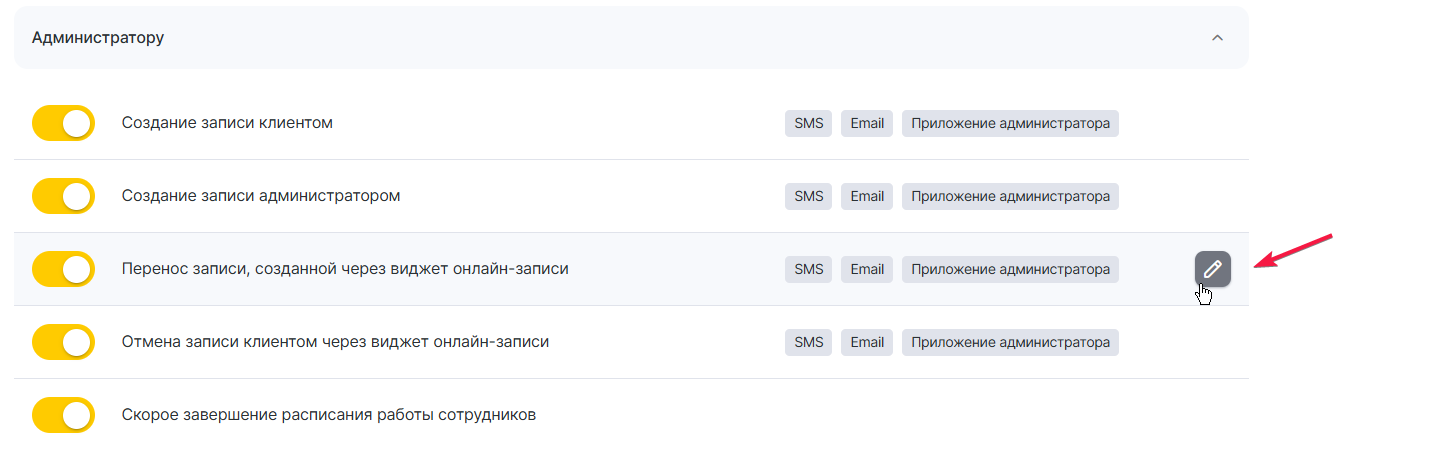
Перейдите в основном меню в раздел Настройки > блок Системные настройки > Уведомления на вкладку «Типы уведомлений».

<figure><img src="/files/11DawMWCg5wo1w0ls4Fn" alt=""><figcaption></figcaption></figure>

### Шаблоны

Вы можете использовать стандартные шаблоны или создать свои

<figure><img src="/files/LLDfkD64TfRXpfNcSbzF" alt=""><figcaption></figcaption></figure>

### Переменные:

● Имя клиента. Имя клиента, указанное в карточке клиента или окне визита в поле «Имя». (В этой переменной не учитываются фамилия и отчество), если они включены в разделе Настройки > блок Настройки записи > Журнал записи.

● Номер телефона клиента. Номер телефона клиента, указанный в записи.

● Услуги в визите. Названия услуг, которые указаны в визите

● Имя сотрудника. Имя сотрудника к которому назначена запись

● Дата и время записи. Дата и время визита в полном формате: %число%, %месяц% — текстовое значение, %год% — полный, %время% — в формате «в 00:00».

Подробное описание типов уведомлений можно найти в [официальной документации Yclients](https://support.yclients.com/28--tipy-uvedomlenij).

---

# Agent Instructions
This documentation is published with GitBook. GitBook is the documentation platform designed so that both humans and AI agents can read, navigate, and reason over technical content effectively. Learn more at gitbook.com.

## Querying This Documentation
If you need additional information that is not directly available in this page, you can query the documentation dynamically by asking a question.

Perform an HTTP GET request on the current page URL with the `ask` query parameter, and the optional `goal` query parameter:

```
GET https://docs.intellectdialog.com/crm-sistemy/yclients/tipy-triggerov/administratoru/perenos-zapisi-sozdannoi-cherez-vidzhet-onlain-zapisi.md?ask=<question>&goal=<endgoal>
```

`ask` is the immediate question: it should be specific, self-contained, and written in natural language.
`goal` is optional and describes the broader end goal you are ultimately trying to accomplish on behalf of the user. GitBook uses it to tailor the answer towards what is most useful for that goal.

The response will contain a direct answer to the question and relevant excerpts and sources from the documentation.

Use this mechanism when the answer is not explicitly present in the current page, you need clarification or additional context, or you want to retrieve related documentation sections.
